
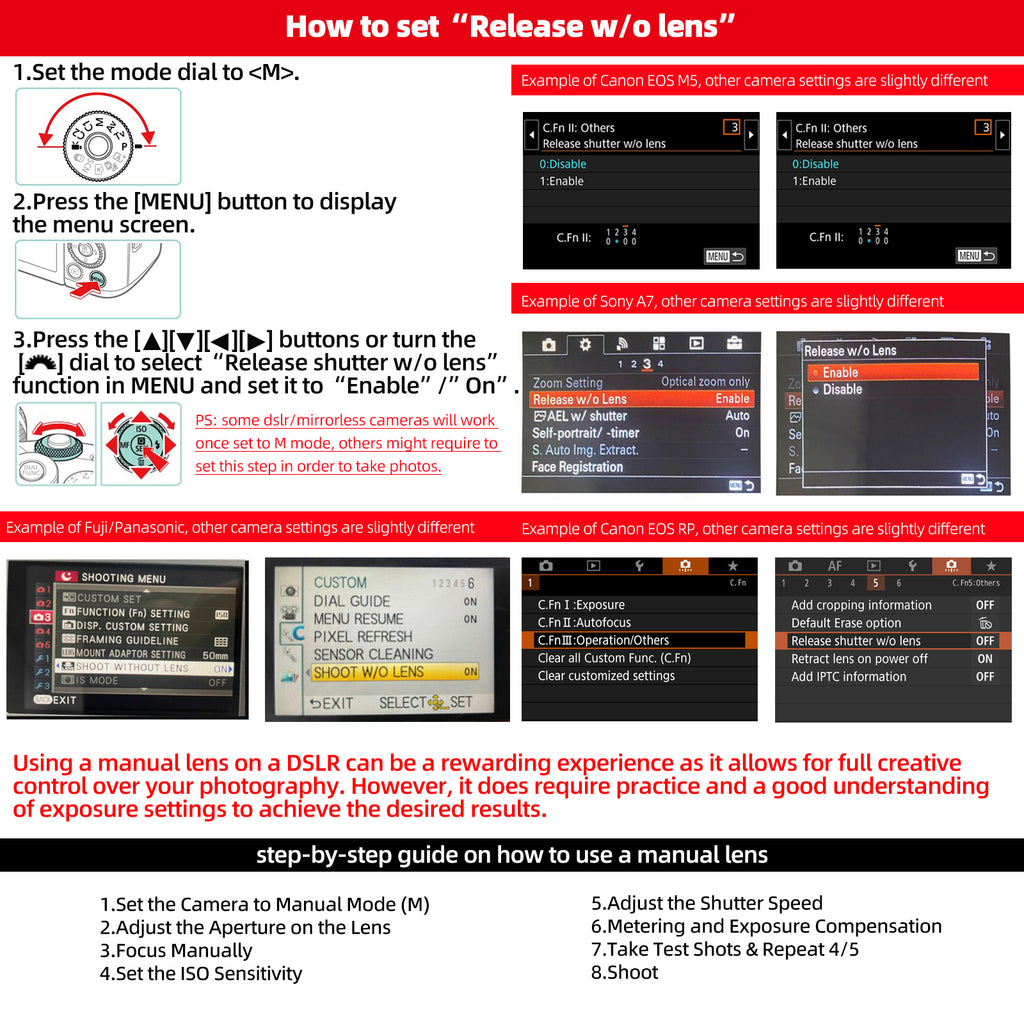
Wie benutzt man


how to use a manual lens on dslr/mirrorless cameras

a. Set the mode dial to Manual (M).

b. Set the Release w/o Lens option in the camera menu to Enable.

  1. Select → MENU → Custom Settings → Release w/o Lens → Enable.
  2. Set the Shutter lock option, if available, in the camera menu to Off: no lens.

c. Manually set the shutter speed, aperture, ISO, and focus.

    For most dslr cameras, setting the "Dial" to M mode will enable the ability to use lens manually, however, some mirrorless cameras might require a further step---setting shutter lock option to Off: no lens.


    How to Fasten/Loose T rings

    https://cdn.shopify.com/videos/c/o/v/9d99bd0e7b4b4a3f84f0d5d547ab4996.mp4

    https://cdn.shopify.com/videos/c/o/v/42618d4ed32a47238b23683e0516059b.mp4

    https://cdn.shopify.com/videos/c/o/v/1b8d7a01e1714f37a41016736442f961.mp4

    https://cdn.shopify.com/videos/c/o/v/00595a354b4e4440ae602c3e0c297056.mp4

    https://cdn.shopify.com/videos/c/o/v/ba34b0feed3d4b1f907f9ef6562a4d81.mp4

    CONTACT US

    • Customer Service
              Email: customerservice@lightdow.com
    • Marketing Inquiry
              Email: georgeqiu@lightdow.com
              Tel: +86 0755 25436654